



Track a specific path
Measure how many sessions follow the path you expect. · 3 min readThe Flow shows what testers did. A target path (also called a funnel) measures whether they followed the path you expected: for example Home → Product → Cart → Checkout.
Create a path
In the Flow tab, Track a specific path section: give it a name, choose 2 to 10 screens in order, then “Create the path”.
Read it
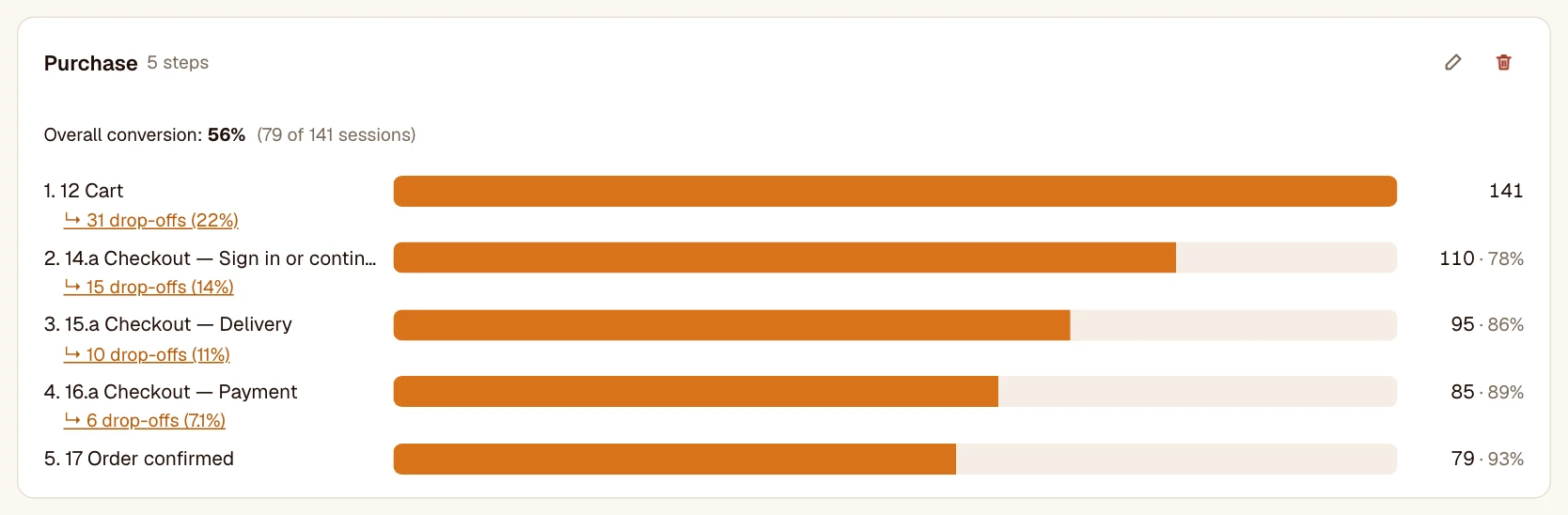
- A session reaches a step if it saw all the previous steps in order. Detours between two steps are allowed.
- For each step: the number of sessions and the conversion from the previous step.
- Overall conversion: sessions that reached the end ÷ sessions that entered the path.
- Click a step’s drop-off to see the sessions that stopped there.
Was this article helpful?